
Buddy Punch Reviewed & Compared: Time Tracking Worth Every Penny?
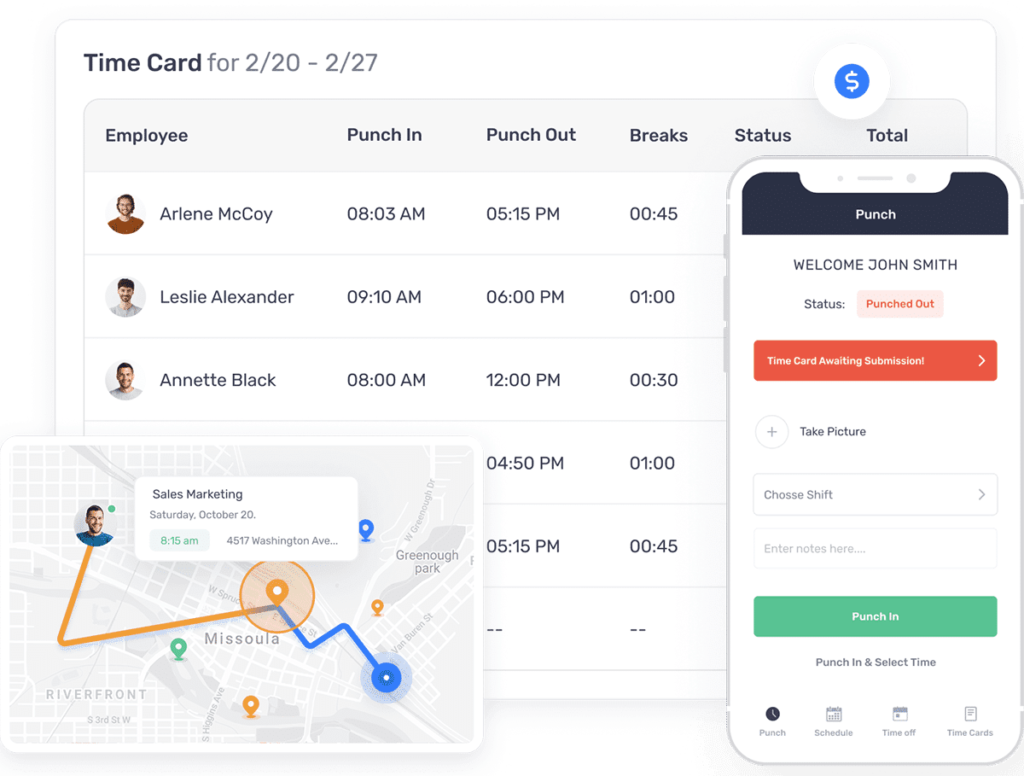
Try Buddy Punch Free for a 14 Day Trial.
💼 Buddy Punch Review & Competitor Comparison: Time Tracking Worth Every Penny?
Tracking employee hours, managing schedules, and running payroll can quickly overwhelm small to medium-sized businesses—especially if you have remote staff or hourly workers. Buddy Punch promises a sleek solution with cloud-based time tracking, scheduling, and mobile apps. But is it worth the cost? Let’s dig into what you get—and who it’s best for.
➡️ Try Buddy Punch free for 14 days—no credit card needed
💰 Pricing That Scales with Your Needs
Buddy Punch offers three core plans—Priced per user + a flat monthly base fee. Pricing is transparent and flexible, with options for monthly or annual billing (annual saves ~15%). Check website for latest pricing.
🛠️ Standard Plan
-
$4.49 USD/user/month
-
£19/USD → base fee per month
-
Includes time tracking, PTO, GPS punches, mobile apps, job tracking, payroll integration, reporting
🚀 Pro Plan (Most popular)
- $5.99 USD/user/month
- £19/USD → base fee per month
-
Adds scheduling, shift trades, QR/PIN kiosk, geofencing, webcam punches
🏢 Enterprise Plan
-
$10.99 USD/user/mo
-
£19/USD → base fee per month
-
Includes everything in Pro plus API access, SSO, advanced GPS, and dedicated support
🔧 Add-Ons:
-
Payroll: $6/user/mo
-
Real-time GPS: $2/user/mo
-
Advanced Reporting / Data Retention / AI Analytics: $2 each
➡️ With annual billing, users can save ~15–20% compared to monthly pricing
➡️ Try Buddy Punch free for 14 days—no credit card needed
📱 Mobile App & Punching Made Easy
Buddy Punch’s iOS/Android app is intuitive and reliable:
-
GPS-based clock-ins – know where staff punch in
-
Facial recognition & webcam – helps prevent “buddy punching”
-
Shift screenshots & push notifications, approvals, PTO, and timecard editing all from the app
-
Ideal for retail, construction, healthcare, or any staff working off-site
👥 Best Fit by Organization Type
| Organization Type | Recommended Plan | Why It Works |
|---|---|---|
| Small retail/office teams | Standard Plan | Keeps track of hours, PTO, breaks, and reporting |
| Hybrid/remote workers | Pro Plan | Adds scheduling, geofencing, kiosk check-in |
| Multi-site/enterprise | Enterprise Plan | Includes SSO, API, advanced GPS + support |
⚙️ Feature Highlights by Plan
-
Standard: Essential + GPS punches + PTO + alerts + reporting
-
Pro: All Standard plus shift scheduling, shift trades, geofence, QR/PIN punches, webcam verification
-
Enterprise: All Pro plus dedicated support, API, single sign-on
📈 Mobile App Advantage
-
Full visibility into workforce location and clock-in times
-
Push alerts for shifts, late punches, and PTO requests
-
Real-time corrections via mobile for missed punches or edits
🤝 Comparisons – Why Buddy Punch Stands Out
Compared to QuickBooks Time (TSheets) or Clockify:
-
Superior mobile punch integrity with GPS, geofencing, webcam, and facial login
-
Better scheduling + PTO management
-
Higher starting price, but strong support and simplicity
💡 Final Verdict
If your team needs beyond-basic time tracking, especially with remote staff or field workers, Buddy Punch is a powerful, cost-effective solution. With its mobile punch solutions and easy-to-use features, it’s ideal for small to mid-sized organizations.
-
Starter Plan (~£18 base + £3.50/user): Great for basic tracking
-
Pro Plan (~£14 base + £5.50/user): Excellent for schedule and location tracking
-
Enterprise Plan (~£18 base + £9.50/user): For advanced needs & integrations
➡️ Try Buddy Punch free for 14 days—no credit card needed
Need help choosing the right plan? Reply with your team size and needs—I’ll recommend the perfect setup.
➡️ Try Buddy Punch free for 14 days—no credit card needed
